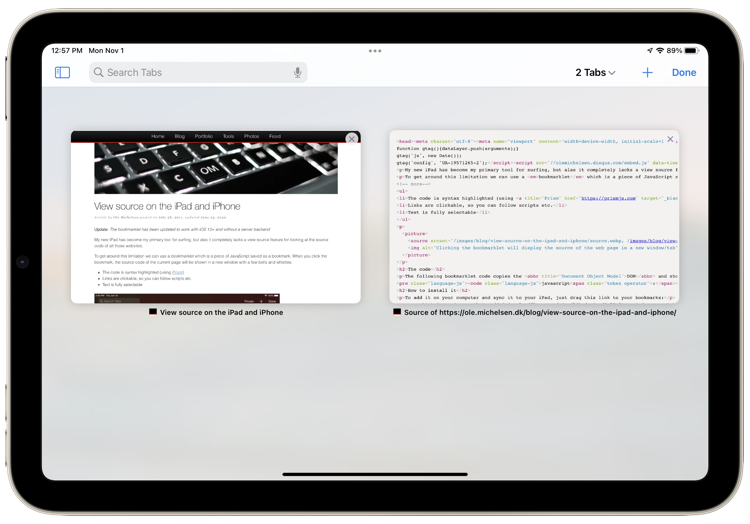
As a web developer I’m frequently looking at the source code of various websites. Lately my new iPad has become my primary tool for surfing and reading documentation, but alas it completely lacks a view source feature.
A fine solution is to create a bookmarklet, which is a piece of JavaScript saved as a bookmark. When you want to see the source of a web page, just click the bookmark and the source of the page is displayed. I was inspired by this bookmarklet by Rob Flaherty, but it has a few shortcomings. To improve upon the bookmarklet concept, I created my own version with a few more bells and whistles:
- The code is syntax highlighted (using GeSHi)
- Links are clickable, so you can follow scripts etc.
- Text is fully selectable
The code
The following bookmarklet code basically posts the entire DOM to my server, which then takes care of business server-side:
javascript:(function(){ var w = window.open('about:blank'), s = w.document; s.write(''); s.close(); var f = s.body.appendChild(s.createElement('form')); f.setAttribute('method','post'); f.setAttribute('action','http://ole.michelsen.dk/viewsource/?uri='+location.href); var i = f.appendChild(s.createElement('input')); i.setAttribute('type','hidden'); i.setAttribute('name','DOM'); i.setAttribute('value',encodeURIComponent(document.documentElement.innerHTML)); f.submit(); })(); |
How to install it
To add it on your computer and sync it to your iPad, just drag this link to your bookmarks:
View Source (click to try it out)
To add it directly from your iPad (or iPhone), you need to create the bookmark manually:
- Add this page as a bookmark
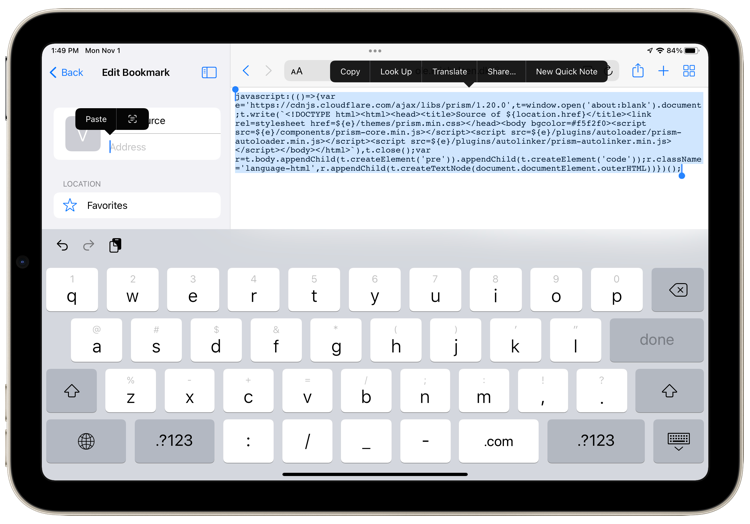
- Then click here to see the bookmarklet code and Select All → Copy
- Now edit that same bookmark, paste the code you just copied into the URL and name it something like “View Source”
Voilá!
Note that the source shown is the generated DOM, and not the original HTML. These might differ depending on the amount of JavaScript used on the page.
Update April 5, 2012
By popular demand, I have published the server-side PHP code to GitHub, so you can modify or host your own version of the bookmarklet. Remember that GeSHi is required.

I love it. Been looking for this a long time. Thank you very much.
Thanks for the awesome post, Ole. I was looking for ways to view the source code of a page on my iPad this weekend. Very much appreciated!
Or you could use icab.
Are you going to post the source code anywhere? Would love to fork! Line numbers and no line wrapping would be incredible!
Pingback: How to “View Source” from Safari on an iPad or iPhone |
Pingback: Visualizza sorgente su iPad | Mac Blog
Thanks for posting this, extremely useful!
I agree, this is good stuff. Would you post the source? I’d love to put this on my own server, rather than relying upon your continued good will (and wallet, you know–bandwidth could get out of hand).
Hi Mike and Benjamin, I have updated the article with the source-code (PHP) for the back end stuff. Feel free to improve on it for your own needs.
Pingback: 如何在移动版 Safari 浏览器上”查看源代码”[教程] | .i.分享
Thanks for sharing the source code.
Out of curiosity: why are you dumping the [javascript] modified code to the server. Why not pull a clean copy of the HTML from the URL?
The only upside to dumping the actual DOM (that I can think of) is if the page in question is under restricted access…?
That was actually the primary reason. I’m often testing pages for work over VPN, which my server doesn’t have access to.
Also, at the time I made this bookmarklet, I was developing a 100% AJAX page, targeting Google’s hash fragment crawling scheme. Here I needed the DOM, since the base page only contained an empty body tag.
But I have considered adding a small control panel to the source-page, so you can request the “real” page instead, and perhaps also add line numbers and no-wrap etc.
Pingback: Como ver el código fuente de una web en Safari desde iPhone o iPad | SomosIphone.com
Pingback: You Can Now View the Source on the iPad and iPhone | Down 3 feet
Brilliant. Thanks.
This is what I was missing; sorely..
THANKS!!!
This is so cool, I hate to add a request, but here goes…
Along with the line numbers/no-wrap above, adding appropriate indents to the source would make readability much much easier…
Cheers on a great bookmarklet!
Atg
Pingback: Ole Michelsen has created a View Source bookmarklet for the iPad… « 13fqcs
Any chance support for scheme-relative URLs, e.g.
//example.com/can be added? Currently these links break in the source view.To fix this, you could simply replace
//at the start of any URLs withhttp://if the original page was served over HTTP, orhttps://if it used SSL.Nice work!
Pingback: Harvest Playback, April 7th Edition | HARVEST Time Tracking and Invoicing Blog
Thanks for this. I made a similar bookmarklet called Snoopy (http://snoopy.allmarkedup.com/) a while ago that will give you highlighted source code (both ‘actual’ and generated) on iOS browsers (without a server-side component), which may be of interest. You can’t follow the links like you can on this though
Thanks so much. And totally easy. I went from my desktop to my devices in seconds! What a welcomed addition to mobile Safari! Excellent job.
Pingback: How To View Page Source On Safari In An iPhone or iPad « TecHow
Pingback: iPhoneやAndroidでページのHTMLソースを表示する方法 | ミニミニ大作戦
Pingback: How to View Website Source Codes on iPad / iPhone [Quicktip] | FunWP.com
Pingback: How to View Website Source Codes on iPad / iPhone [Quicktip]
Pingback: How to View Website Source Codes on iPad / iPhone [Quicktip] | Best Web Consulting company in Nashik, India with Creative and Professional Website Design, Content Management Systems, Wordpress Experts, Ecommerce SEO, and more..
Pingback: How to View Website Source Codes on iPad / iPhone [Quicktip] | Android News
Pingback: Cómo ver el código fuente de una web en un iPad o iPhone | ceslava | diseño & cursos
Pingback: Jasonmcdermott » On ‘View Source’ and mass creativity
Pingback: Quellcode einer Webseite « iAppMag
Pingback: How to View Website Source Codes on iPad / iPhone [Quicktip] | Indoor Digital Billboards
Hello!
I just wanted to say thanks for this neat piece of code : I’ve been trying many apps but none of them were effective. I finally found your page and followed the very simple tutorial. Now, the viewing of the source code is made easier with the standard colors and it’s pretty quick. Thanks for your time and efforts.
Ben.
Pingback: 在手機和平板上觀看網站原始碼 | 超級電腦網
Ole, I am wondering if you are logging the source code that is rendered when I use your resource?If so, would you please use my email to respond, and I can explain further.
Thank you for your excellent work.
Hi David,
No, I am not logging anything from the posted requests. They are only sent to the server to be formatted for display.
It’s really useful! Thank you very much!
Hi, i think it stopped working on IOS6
It’ was usefull
Hi Gino, I have tested on both iPhone and iPad with latest iOS and it seems to work fine. Perhaps you should recreate the bookmarklet again?
Pingback: The Dev Box : 22 November 2012 | Janes Oosthuizen
Pingback: Web Developer Bookmarklets for iOS: Extending Mobile Safari
Very good post, it’s very useful
Pingback: Design.Development & Technology » Blog Archive
Pingback: Mobile Marketing Conversion Optimization Tools & Code Tricks | Experts Bto
Pingback: Techno Pizza: Viewing a sites source code on your iPad or iphone | virtual pizza